Dynamic Media (Image)
Prerequisites
- Enable the extension named Custom Asset Picker for AEM in the Extension Manager.
- Environment should have the config files for remote repo. (The config files for image and video picker come as part of reference demo installation package and are available at location /content/dam/config/)
Below are the typical steps to follow for Smart Crop to work with Dynamic Media (Image):
- Create Image profile for smart crops.
- Apply the profile on the folder on which you need to generate smart crop renditions.
- Reprocess the assets if the asset already existing or upload new assets.
- After processing completes -> Open Image Properties and set “Review Status” to Approved and then publish the assets. This step is needed for the image to reach the Delivery Server of DM Open API.
- It may take 2-5 mins for smart crop renditions of the asset to be available on DM OpenAPI.
Authoring :
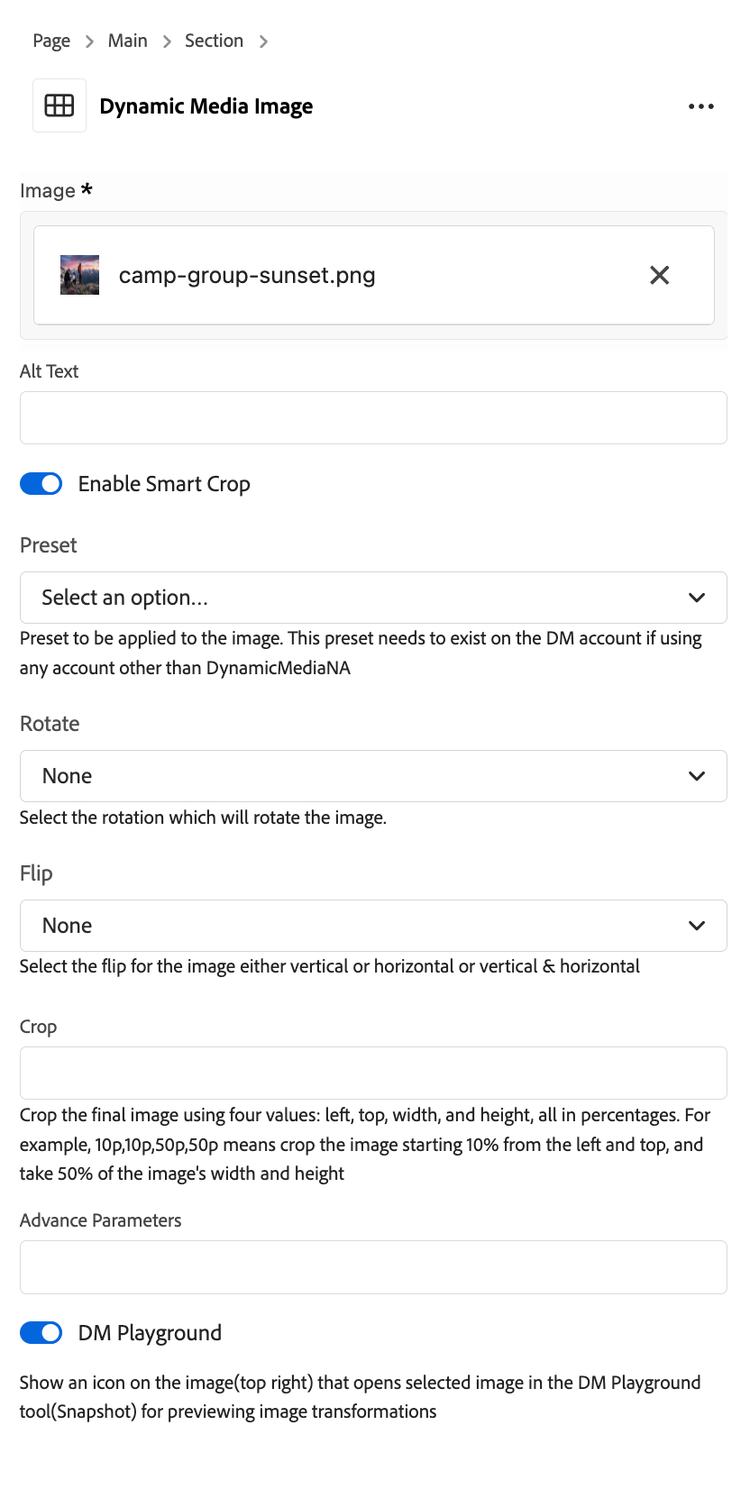
- Add “Dynamic Media (Image)” block to your page and edit block’s properties.
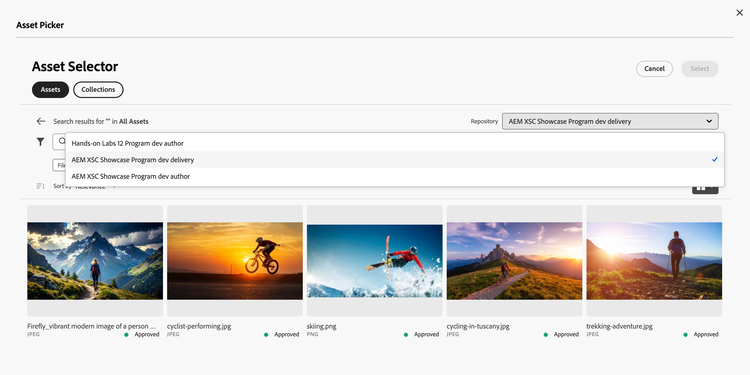
- Click on asset selector which will open asset picker.
- You can also author other modifiers e.g. Flip, Rotate, Preset etc.
You will see remote repo listed if you have image.config.json file present at location /content/dam/config/image.config.json and the extension for custom asset picker enabled
- Select any delivery server from the Repository dropdown. (preferably the remote repo named “AEM XSC Showcase Program dev delivery”).
- Select the asset. Once asset is selected it will render on the page.
- You have below properties to configure:
- Default (Asset Background): Text overlays the image.
- Asset Left / Asset Right: Asset (image or video) and text are side-by-side.
- Asset Top / Asset Bottom: Asset stacked above or below text.
- Asset -Background Text-Left / Text-Right: Asset as background; text aligned left or right.
- Enable Smart Crop: This option will enable smart crop on the asset.
- Preset: You can select the presets available from this drop down. Some presets may have additional configuration which will be enabled once preset is selected.
- Rotate: You can select the rotation from the drop down.
- Flip: You can select the flip direction from the drop down.
- Crop: Crops the image using four values: left, top, width, and height, all in percentages. For example, 10p,10p,50p,50p means crop the image starting 10% from the left and top, and take 50% of the image's width and height
- Advance Parameters : For manually entering advance modifiers for the image. e.g. brightness=80 etc. These can be generated from the dynamic media snapshot page.
- DM Playground : Toggle an icon that will appear on the right top corner of the image for redirecting user to the snapshot page. The loaded snapshot page will have the image