Setting up your brand specific site (GitHub Setup):
IMPORTANT
Prerequisite: Install and replicate the latest version of Reference Demo package from this link on your AEM environment using CRX Package Manager.
Make sure to follow the below steps in mentioned order.
- Create a copy in your GitHub: https://github.com/AEMXSC/RefDemoEDS
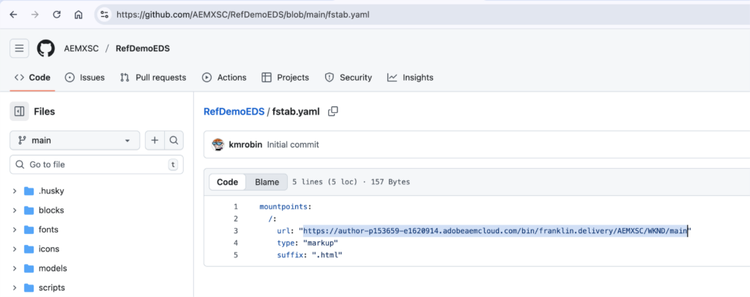
- In your cloned GitHub repo, update “fstab.yaml” file to point to your own AEM env and git location:
- There are 3 parts of the URL that need to be updated:
https://XXX/bin/franklin.delivery/YYY/ZZZ/main - XXX should be replaced by the URL of your AEM Author environment.
- YYY should be replaced by your GitHub user account.
- ZZZ should be replaced by the name of the GitHub repository you chose while cloning.
- There are 3 parts of the URL that need to be updated:
- Configure the AEM Code Sync plugin: https://github.com/apps/aem-code-sync
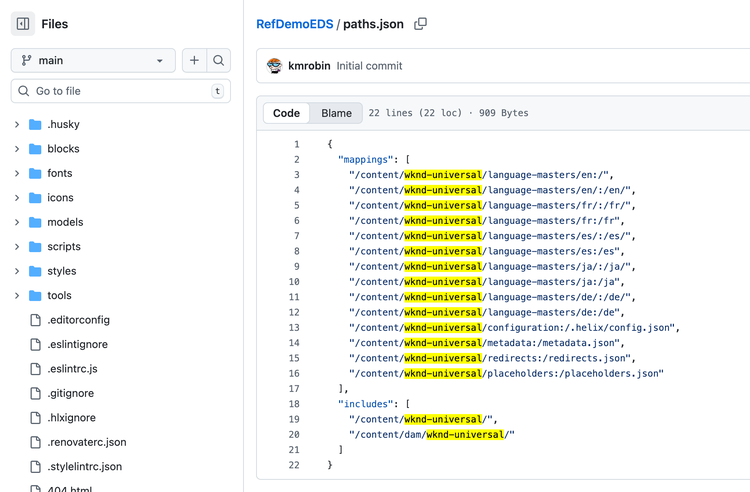
- Also, you will need to update paths.json file to map paths as per your brand site.
- Replace all occurrences of “wknd-universal” with your brand site name e.g. “abc”.
IMPORTANT
Please remember the brand site name as same would be required for creation of your brand site on AEM Instance.