Hero Block
Once you introduce a Hero block on your page, multiple fields appear for authoring. Here is a brief about the properties of a Hero block.
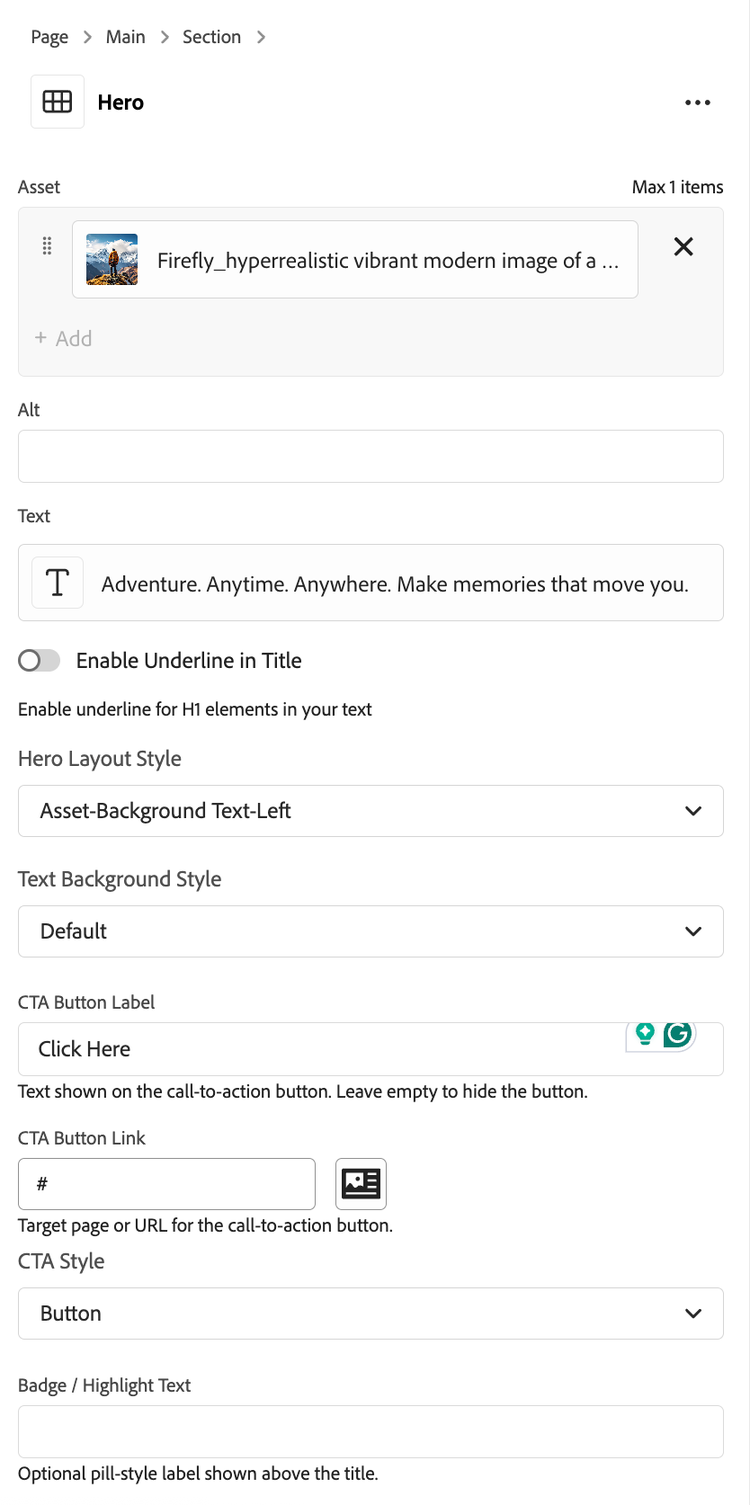
- Asset: Author Image or Video for the Hero block.
- Enable Underline in Title: Toggles an underline styling on the hero H1 title text.
- Hero Layout Style:
- Default (Asset Background): Text overlays the image.
- Asset Left / Asset Right: Asset (image or video) and text are side-by-side.
- Asset Top / Asset Bottom: Asset stacked above or below text.
- Asset -Background Text-Left / Text-Right: Asset as background; text aligned left or right.
- Text Background Style:
- Default: Inherits normal page styling.
- Theme Dark: Dark-themed background with contrasting text.
- Theme Light: Light-themed background.
- CTA Button Label
- Once authored shows a button on the hero banner.
- CTA Button Link
- Link to redirect to, once button is clicked.
- CTA Style:
- Link: Renders CTA as a text link.
- Button: Standard primary button.
- Button secondary: Secondary/outlined style.
- Dark Button: Dark variant for contrast on light backgrounds.
https://s7d1.scene7.com/is/content/AEMHOL/HeroBlock