Download List Block
The Download List block displays a curated list of downloadable files from AEM Assets.
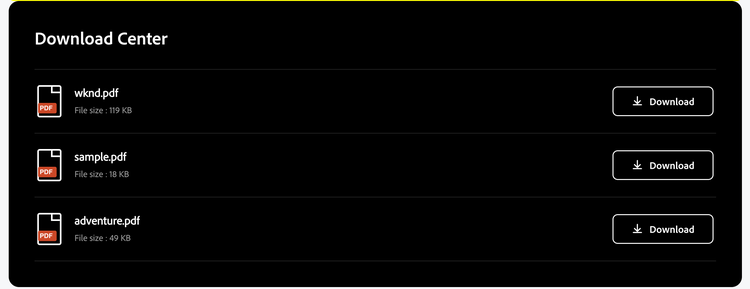
Authors can point the block at an entire DAM folder, pick individual files across folders. Each row shows a file-type icon, file name, formatted size, and a download action.
NOTE
The block works on AEM Author without any additional configurations.
For it to work on “aem.live / aem.page” domain, you will need to update CORS config on your AEM environment toa whitelist “aem.live/.page”. Also, configure hostname property in “placeholders” as per your AEM URL.
For it to work on “aem.live / aem.page” domain, you will need to update CORS config on your AEM environment toa whitelist “aem.live/.page”. Also, configure hostname property in “placeholders” as per your AEM URL.
Block properties
- Section Title: Optional heading above the list (default: Download Center).
- Asset Folder: DAM folder path; all files inside are listed automatically.
- Individual Files: Multi-select asset references; overrides folder when populated.
- File Types: Filter folder/manifest results by type — PDF, Word, Excel, PowerPoint, Images, Video, Audio, Archive. Leave empty for all types. Does not filter hand-picked individual files.
- Sort By: Name (A→Z or Z→A), Newest/Oldest, Largest/Smallest.
- Max Items: Maximum rows to show; 0 = no limit.
- Download Button Label: Text beside the download icon; leave empty for icon-only.
- Background Color / Text Color: Optional CSS colors (hex, rgb, or CSS variables) for the block band and text.
Quick Tips
- Use Individual Files when you need a fixed list from multiple DAM folders.
- Use Asset Folder when the folder contents should stay in sync as assets are added or removed.