Translation
https://s7d1.scene7.com/is/content/AEMHOL/TranslateSite
Prerequisites for translation
- Translation service (usually with MS license) is configured on your AEM env.
- Using latest release of Ref Demo code and content package.
- English is assumed as the base language (however, you can tweak this
- In you AEM environment,
- Navigate to :<aemhost>/ui#/aem/libs/cq/translation/translationrules/contextproperties.html?context=/content/dam
- In the “References” Tab, add an entry for resourceType = core/franklin/components/block/v1/block and referenceType = reference
This step is needed to translate referenced content e.g. content fragment in the page.
Translate your site
Navigate to the Base Language Node
- In AEM Sites console, browse to your site structure. For example: WKND Universal > Language Masters > English
- Select the base language root (e.g., English) that you want to use as the source for translation.
Initiate Language Copy
- With the base language node selected, choose Create > Language Copy from the top menu.
- The Create Language Copy wizard opens, guiding you through the setup of your new translated site.
Configure the Language Copy
- Choose Target Languages
- Select one or more target languages into which you want to translate your content.
- Each language selected creates a new root node under the target region.
Create Translation Project
- In the Project dropdown, select Create Translation Project(s).
- This will create a dedicated translation project in AEM Projects console.
- If needed, you can open the project later to add or remove content files.
And once you click on ‘Create’, in a couple of seconds, your site should be translated into selected languages.
Add a new language in Language Selector
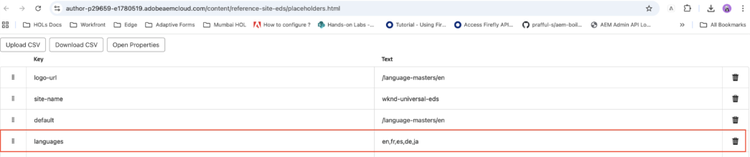
Please follow the below steps only if you intend to add a new language to your project as by default ‘en, fr, es, de, ja’ are available.
- From AEM Sites console, navigate to WKND Universal > Placeholders.
- Update the placeholder value for language field. Language dropdown would appear according to this placeholder value.